Routers With a WiFi On/Off Button: An Easy Way to Control Your Home WiFi
3/12/2026
Many people are surprised to learn that most Internet routers broadcast WiFi signals continuously, even when no one is using the network.
For many households, that’s perfectly fine. But others prefer the ability to turn WiFi on or off whenever they choose.
Unfortunately, most Internet routers require logging into complicated settings pages just to disable wireless networking. That’s why many homeowners are now looking for routers with a simple WiFi on/off button that can instantly enable or disable the wireless signal.
This feature works with almost any Internet provider, including:
-
Starlink
-
cable Internet
-
DSL
-
fiber Internet
-
fixed wireless providers
Adding the right router can give you quick and simple control over your home WiFi network.
Why Some People Want to Turn WiFi Off
There are several common reasons homeowners want the ability to quickly control WiFi in their home.
Managing Screen Time
Parents often want a simple way to disconnect devices without needing complicated parental-control apps.
Turning WiFi off immediately disconnects:
-
phones
-
tablets
-
gaming consoles
-
smart TVs
For many families, this is an easy way to manage screen time or limit internet access during certain hours.
Reducing Distractions
Some households simply want the ability to control when the internet is available. Temporarily turning off WiFi can help reduce distractions during homework time, work hours, or family activities.
Network Control and Security
Turning WiFi off when it is not needed prevents new wireless devices from connecting to your network. While strong passwords are still the best protection, some homeowners prefer having the option to temporarily disable wireless access entirely.
Health Concerns and Wireless Signals
Another reason some people want the ability to turn WiFi off relates to concerns about radiofrequency signals from wireless technology.
WiFi, cellular networks, and many other modern devices communicate using radiofrequency (RF) signals. These signals are classified as non-ionizing radiation, which means they do not have enough energy to damage DNA the way ionizing radiation (like X-rays) can.
Health agencies such as the World Health Organization (WHO) and the U.S. Federal Communications Commission (FCC) note that typical WiFi exposure levels in homes are far below established safety limits.
At the same time, discussions about 5G networks, wireless signals, and electromagnetic exposure have increased public awareness and concern about how much wireless technology surrounds us.
While most scientific studies have not found evidence that typical WiFi exposure causes health problems, some people prefer to follow a precautionary approach and reduce wireless signals when they are not needed.
For those homeowners, having the ability to quickly turn WiFi on or off provides peace of mind and personal control over their environment.
Routers That Allow You to Turn WiFi Off With a Button
Some router manufacturers include a physical WiFi on/off button that allows you to instantly disable the wireless signal without logging into router settings.
Pressing the button simply turns off the wireless radios while leaving the wired internet connection active.
Brands that often include this feature include:
-
Netgear routers
-
TP-Link routers
-
ASUS routers
Because router models change frequently, it’s best to check the specifications for features such as:
-
WiFi On/Off Button
-
Wireless Radio Toggle
-
Hardware Wireless Switch
These routers allow homeowners to turn WiFi on or off in seconds.
Using These Routers With Starlink
Starlink systems can work with third-party routers that provide additional features.
In many cases, users place the Starlink router into bypass mode and connect their own router to manage the home network. This allows them to use routers that offer features like:
-
WiFi on/off buttons
-
advanced parental controls
-
improved network management
-
expanded coverage
Because of this flexibility, many Starlink users choose to use a router that gives them more control over their network and wireless signals.
A Simple Feature That Gives You More Control
For many households, the ability to turn WiFi on or off whenever they want is simply about having control over their technology.
Whether the goal is:
-
managing screen time
-
reducing distractions
-
improving network control
-
or minimizing wireless signals when not needed
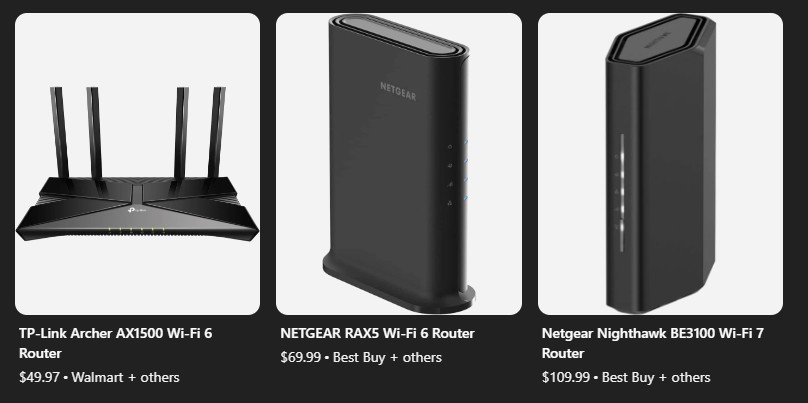
routers with a WiFi on/off button provide a simple and effective solution. Here are a few examples: